Pocket Option Signals: How to Get Free Signals and Use Them (2026)
We are a Pocket Option partner and may receive compensation. Learn more
Updated: 2026-10-15
Search for Pocket Option signals and you get two very different things: analysis services that publish an entry, a timeframe and a rationale, and referral funnels that publish arrows. Telling them apart takes about five minutes if you know what to look for.
Quick answer
To get free Pocket Option signals from Signal AI, open the Mini App in Telegram, connect a Pocket Option account opened through the partner link (minimum $10 deposit, no subscription), choose a pair and timeframe and request an analysis. You receive a direction, confidence score and the reasons behind it. Set the expiry equal to the timeframe and test on demo first; no signal guarantees a win.
How to get free Pocket Option signals
1. Open the Signal AI Mini App in Telegram.
2. Connect a Pocket Option account opened through the partner link; signal access requires the minimum $10 deposit. There is no subscription fee.
3. Choose a pair and a timeframe and request an analysis. You get a direction, a confidence score and the reasons behind it. A confidence score is not a guaranteed win rate.
4. Test the first signals on the demo account with a fixed stake before using real money.
What a usable signal contains
A signal you can act on states four things: the instrument, the direction, the expiry length, and the reason. Without the expiry the signal is unusable on a binary platform, because the same direction is correct on 5 minutes and wrong on 30 seconds.
The reason matters more than it looks. "EUR/USD up, 3 minutes" is a guess you cannot evaluate. "EUR/USD up, 3 minutes, liquidity swept below the session low and structure broke upward" is a claim you can check on your own chart.
Signal AI publishes the direction, the expiry and the technical rationale — support and resistance structure, momentum and Smart Money Concepts — so every signal can be verified against the chart before you take it.
Warning signs of a funnel, not a service
Guaranteed win rates above 90% are the clearest signal to leave. Any honest short-term system lands in a much narrower band, and no method removes the possibility of a losing streak.
Martingale instructions — "double after a loss" — are the second. The strategy mathematically guarantees eventual ruin on a fixed balance, and it exists because a blown account still counts as an active referred trader.
A third: no history you can inspect. If results are only shown as screenshots after the fact, there is nothing to audit. Prefer a source that timestamps signals before the outcome is known.
Testing a signal source safely
Run every signal on the Pocket Option demo account for two weeks, taking all of them rather than selecting the ones you like. Selective taking makes any source look like its best week.
Record the outcome, then compute the actual hit rate and compare it with the payout percentage. At an 80% payout you need roughly 56% correct trades just to break even — that number, not the marketing claim, is the bar.
Only after a real sample should money be involved, and then at the smallest size the platform allows. The minimum deposit is $10, so the cost of a careful start is deliberately low.
Matching expiry to timeframe
The expiry should match the timeframe the signal was calculated on. A one-minute analysis says nothing useful about where price sits in fifteen minutes.
Very short OTC expiries of 3 to 30 seconds have the widest outcome spread. They are a legitimate option, but never the place to increase stake size.
Filters that remove most bad trades
Skip signals during high-impact news for the currencies involved, skip the first minutes after a session open, and skip anything with low indicator agreement.
Signal AI is a Pocket Option affiliate partner and may receive compensation; trading fewer, cleaner setups usually beats trading everything a feed publishes.
How to use Pocket Option signals step by step
1) Open the signal and note the pair, timeframe and expiry it was calculated for. 2) Open the same pair on Pocket Option and set the matching expiry. 3) Check that no high-impact news is due for either currency in the next minutes. 4) Enter with a fixed stake that is a small, predefined fraction of your balance. 5) Record the result and move on — the next signal is a new, independent decision.
The order matters. Most losses come from skipping step 3 or changing the stake in step 4 after a win or a loss.
Are free Pocket Option signals worth using?
Free signals are fine for learning the workflow on a demo account. What they cannot give you is a verified track record, so judge them by transparency: does the source show losing trades, name timeframes and explain the analysis?
Paid channels fail the same test surprisingly often. Price is not a quality signal; published reasoning and honest statistics are.
Do Pocket Option signals actually work?
They work as a filter, not as a guarantee. A signal narrows the moment of entry to a point where several indicators agree; it cannot remove the risk built into a fixed-time trade.
Traders who profit over months do it through discipline: fixed stake, limited number of trades, no recovery betting. Traders who lose usually had a decent signal source and no rules.
Common mistakes on the platform
Trading OTC pairs around the clock without noticing that volatility profiles change completely outside market hours. Chasing a losing streak with bigger stakes. Switching strategy after two losses.
Read the best time to trade guide for session timing, and the binary options signals overview for how to judge any provider.
Signal AI vs typical Telegram signal channels
Most signal channels send a bare "EUR/USD up, 5 minutes" message with no reasoning. Signal AI works differently: you request an analysis yourself, inside the Mini App, and see why the model picked a direction.
| Signal AI | Typical signal channel | |
|---|---|---|
| Reasoning behind each call | Full indicator breakdown and confidence score | None — just direction and expiry |
| When signals are generated | On your request, from live candles | On the channel owner's schedule |
| Martingale after a loss | Never suggested | Often recommended |
| Cost | Free via a partner broker account | Often a paid subscription |
| Pairs covered | 30+ forex and OTC pairs | Usually a handful of majors |
How to read a Signal AI signal card
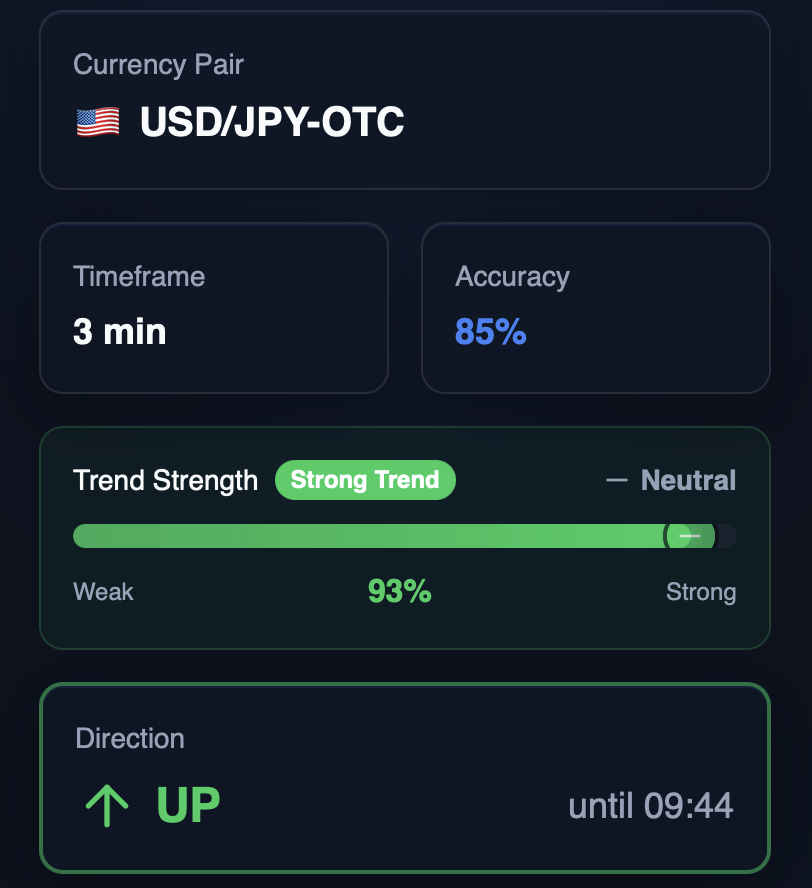
Each card in the Signal AI Mini App shows the same fields. Read them together, not one number in isolation. These rules describe how the bot itself labels a signal; they do not predict the outcome of a trade.
To practise reading cards without risk, use the demo account first.
| Field | What it shows | How to use it |
|---|---|---|
| Direction (UP / DOWN) | The side suggested by the analysis for the chosen expiry | Open a trade only in this direction and only with the matching expiry |
| Accuracy (confidence) | The model's confidence in the analysis | An estimate, not a win rate; it does not guarantee the trade result |
| Trend Strength | 0–100%: Strong ≥75, Moderate 55–74, Mild 35–54, Weak <35 | Below 30% the bot shows a warning; consider skipping the signal |
| Trend direction | The current trend: up, down or neutral | If it differs from the signal direction, the bot warns about a possible reversal |
| Indicator summary | How many indicators lean buy, sell or neutral (Strong Buy … Strong Sell) | A mixed count means the indicators disagree |
| Expiry timer | Time until the signal expires | Do not enter late: after expiry the signal is no longer valid |
What Signal AI does and what it does not do
Does: analyses recent candles of the pair you choose with technical analysis and Smart Money Concepts, then returns a direction, a confidence score and a trend-strength reading. Each request produces a fresh analysis.
Does not: place trades for you, manage your account, use Martingale or any loss-recovery staking, or promise a win rate. A confidence score describes the analysis, not the probability that your trade wins.
Limits: results depend on market conditions; around major news and in thin OTC sessions any short-term analysis is less reliable. Skip a signal if the price has already moved before you can enter.
Example: from request to trade in under a minute
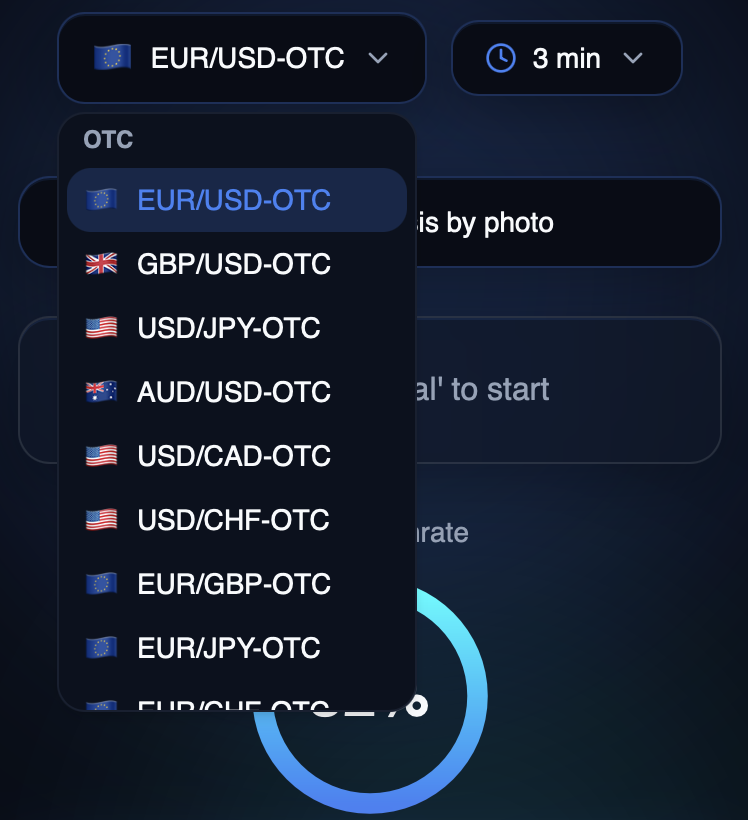
1. In the pair selector pick EUR/USD-OTC and a 3-minute timeframe (see the screenshot above).
2. Request the analysis and read the direction and confidence on the result card.
3. In the Pocket Option terminal open the same pair, set the expiry to 3 minutes and a fixed stake, and check the current payout shown in the terminal.
4. Enter in the direction shown, then log the result. Do not double the next stake after a loss.
More Pocket Option guides
- Pocket Option Registration and Sign Up: How to Create an Account (2026)
- Pocket Option Login: Access, 2FA and Fixing Sign-in Problems
- Pocket Option Minimum Deposit: What $10 Buys You (2026)
- Pocket Option Withdrawal: Methods, Timeframes and Delays
- Pocket Option Promo Code: How Deposit Bonuses Work (2026)
- Pocket Option Reviews: Praise, Complaints and How to Read Them
- Pocket Option Demo Account: How to Set Up and Use It (Free $50,000)
- Pocket Option App: Mobile Trading, Setup and Limitations
- OTC Trading on Pocket Option Explained: Session Timing and Weekend Rules
- Pocket Option Deposit Methods: Cards, Crypto and E-Wallets
- Is Pocket Option Safe? Regulation, Risks and What to Check
- Pocket Option Payouts and Assets: Reading the Percentage
- Pocket Option Trading Hours: Platform Access, Markets and OTC Schedules
- Pocket Option Bot: Signal Bots vs Auto-Trading Bots Explained
- How to Trade on Pocket Option: Step-by-Step Guide for Beginners
- Pocket Option Verification (KYC): Documents, Steps and Common Rejections
- How Long Does a Pocket Option Withdrawal Take? Delays and How to Avoid Them
- Pocket Option Withdrawal to Card: Steps, Limits and Tips (2026)
- Pocket Option Not Withdrawing Money? 7 Common Reasons and Fixes
Popular guides
Pocket Option in practice
A $10 minimum deposit, an unlimited demo account and 5-second expiries on OTC pairs. Signal AI trading signals work on top of the platform.
Free access inside Telegram — no download needed.
Open Signal AI in TelegramAbout our partnership
Signal AI receives affiliate compensation from Pocket Option. This does not change the price or terms for users. Our comparisons are based on publicly available platform terms. Learn more